
Report a Network Issue
 Published: 2025-11-06 16:12
-

-


These systems are in Chinese. Names in Chinese below are exactly what you see on screen; the Glossary explains them.
Service Name: Report a Network Issue
Service For: All currently enrolled students and staff
Service Channel: Online
Processing Time: 1-2 business days
Primary Contact: Network Technology Department (027-87863053)
Service Description: Report any problem you have with the campus network. An engineer handles it, and you can rate the service afterwards.
How to Report
Use any of these:
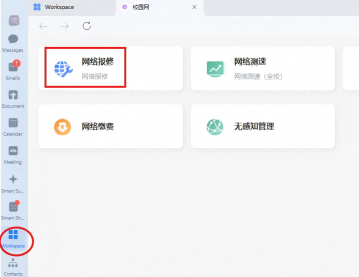
- Phone: 企业微信 → 工作台 → 校园网 → 网络报修. 网络报修 is also directly on the 工作台.
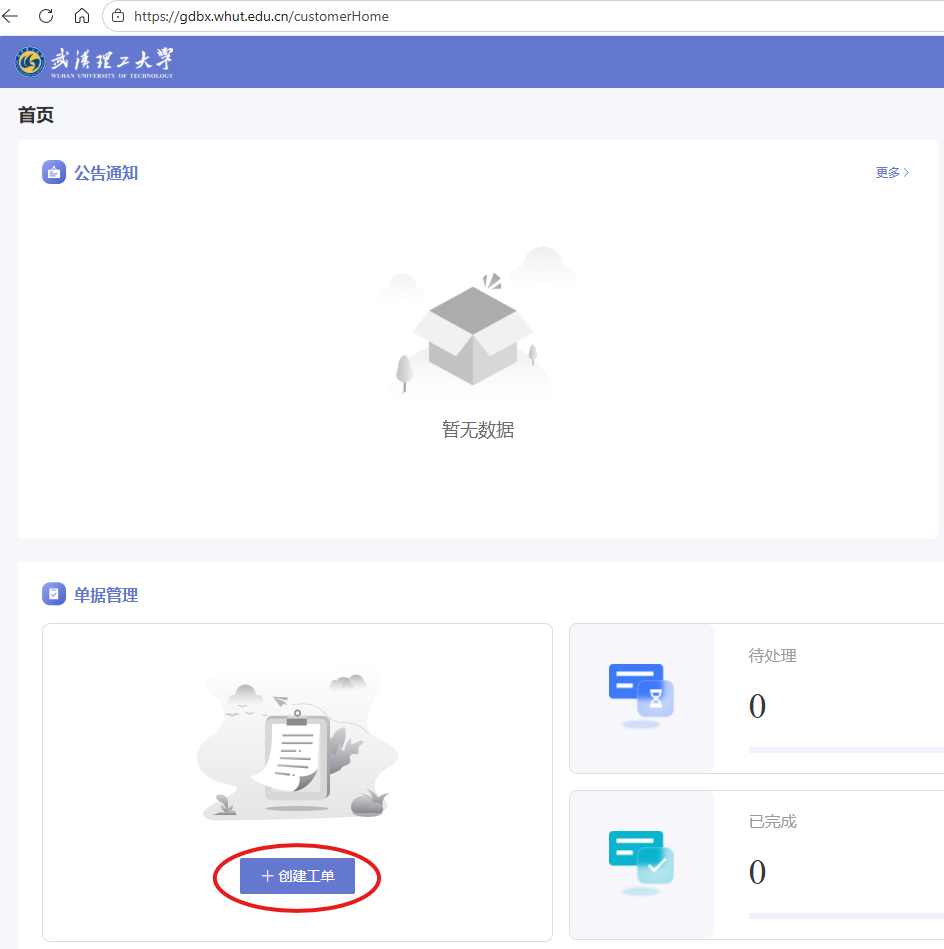
- Computer: gdbx.whut.edu.cn (武汉理工大学网络报修). Sign in with Smart WUT(智慧理工大).
- Hotline: 027-87297533
Fill in the Ticket
- Click 创建工单 (create a ticket).
- Fill in the fields marked *: 联系电话 (phone), 报修问题类别 (有线网 wired or 无线网 wireless), 报修区域 (campus area), 详细地点 (exact location), 问题描述 (short description of the problem).
- If you can, add 详细地点补充说明 (more about the location), 详细问题描述 (more about the problem) and 附件 (a screenshot or photo). Please include your 上网账号 (campus network account).
- Click 提交 (submit).
The home page shows your tickets by status: 待处理 (waiting), 处理中 (in progress), 已完成 (done), 待评分 (waiting for your rating).