
University Email Service
 Published: 2025-11-06 16:18
-

-

These systems are in Chinese. Names in Chinese below are exactly what you see on screen; the Glossary explains them.
Service Name: University Email Service
Service For: All currently enrolled students and staff
Service Channel: Online
Processing Time: Immediate
Primary Contact: User Services Department
Contact Numbers:
- 027-87651975 (马区, Mafangshan campus)
- 027-86548310 (余区, Yujiatou campus)
Service Description: Every registered student and staff member can have one free personal mailbox ending in @whut.edu.cn. Many academic databases the university subscribes to let you create a free account with this address.
1. Apply
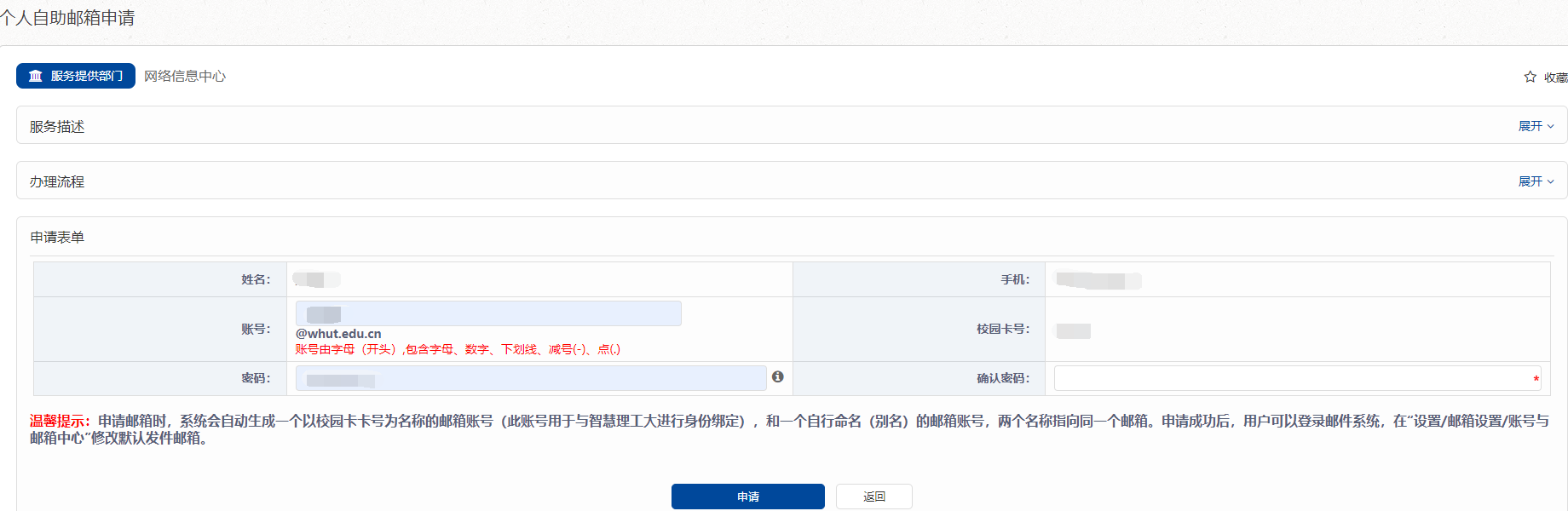
- Sign in to Smart WUT(智慧理工大) (zhlgd.whut.edu.cn) and open 办事大厅 → 服务列表 → 网络中心 → 个人自助邮箱申请.
- Fill in the form under 申请表单: 账号 (the name before @whut.edu.cn; it must start with a letter and may contain letters, digits, _ - and .), 密码 and 确认密码 (password, twice). 姓名, 手机 and 校园卡号 are filled in for you.
- Click 申请 (apply). Normally the mailbox is created at once.
If the application fails, the name may already be taken, you may not have a campus card number yet, or the name or password does not meet the rules. If you do not know your campus card number, call 027-87651975.
No campus card number yet? Bring your student ID documents and passport to the User Services Department, 爱特楼 (Aite Building) room 1908, and we will set up your mailbox.
2. Use
- Open the mailbox from 办事大厅 → 个人自助邮箱申请 → 进入邮箱, without a password, or sign in at mail.whut.edu.cn with 用户名 (the part before @whut.edu.cn) and 密码.
- After you sign in, click English at the top to switch the mailbox to English.
- To use a mail app on your phone or computer, follow these settings. Always enter the full address, including @whut.edu.cn. Turn on “keep a copy on the server”, or mail downloaded to the app disappears from the online mailbox (how).
Good to Know
- One mailbox per person. Choose a name you will want to keep, such as your name in pinyin or your English name.
- The system also creates a second address named after your campus card number, used to link the mailbox to Smart WUT(智慧理工大). Both addresses lead to the same mailbox. To choose which one your mail is sent from, go to 设置 → 邮箱设置 → 账号与邮箱中心.
- Help with common problems: qiye.163.com help center.