
Campus Card Replacement
 Published: 2024-08-19 16:57
-

-


These systems are in Chinese. Names in Chinese below are exactly what you see on screen; the Glossary explains them.
Service Name: Campus Card Replacement
Service For: All students, faculty and staff
Service Channel: Online and offline
Processing Time: Immediate, except in special circumstances
Primary Contact: User Services Department (Wang Guoqing, Wu Gang, Wang Jiemi)
Contact Numbers:
- 027-87669108 (南湖北院校园卡服务点, Nanhu campus card service point)
- 027-87859108 (马区东院校园卡服务点, Mafangshan campus card service point)
- 027-86539108 (余区校园卡服务点, Yujiatou campus card service point)
Service Description:
The Campus Card is a multi-function card provided by the university for its students, faculty and staff. It combines identity verification, library borrowing, on-campus payments, access control and medical services in one card. As technology develops, its functions continue to expand and upgrade. It now supports mobile payment, online top-up and electronic access control, which makes campus life much more convenient.
Procedure:
Campus Card Replacement Procedure
1. Replacement at the Service Counter

- Request a replacement campus card.
- The cardholder takes a valid ID to the nearest 卡务点 (campus card service counter).
- The card service point verifies the data and then produces a new card.
- The cardholder pays the corresponding card fee from the campus card account (at the rate approved by the pricing authority).
- The cardholder collects the new card on the spot.
- Replacement complete.
2. Self-Service Replacement
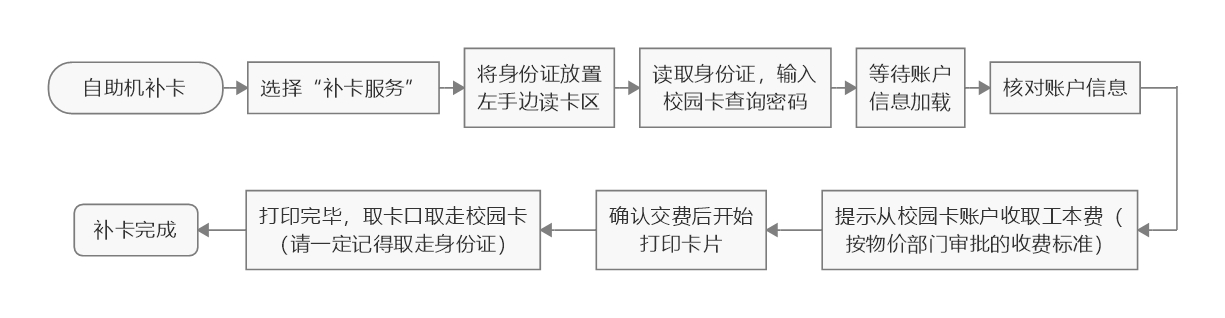
- Start self-service card replacement.
- Select “补卡服务” (card replacement).
- Place your ID card on the card reading area on the left.
- The ID card is read; enter the campus card query password.
- Wait for the account information to load.
- Check the account information.
- The machine prompts that the card fee will be charged to the campus card account (at the rate approved by the pricing authority).
- After you confirm payment, the card starts printing.
- When printing finishes, take the campus card from the card slot (be sure to take your ID card too).
- Replacement complete.